Temperature Data Logger Guide for Restaurant Food Safety
Complete guide to temperature data loggers for restaurants. How they work, placement, alert configuration, FDA compliance, and choosing the right system for your kitchen.
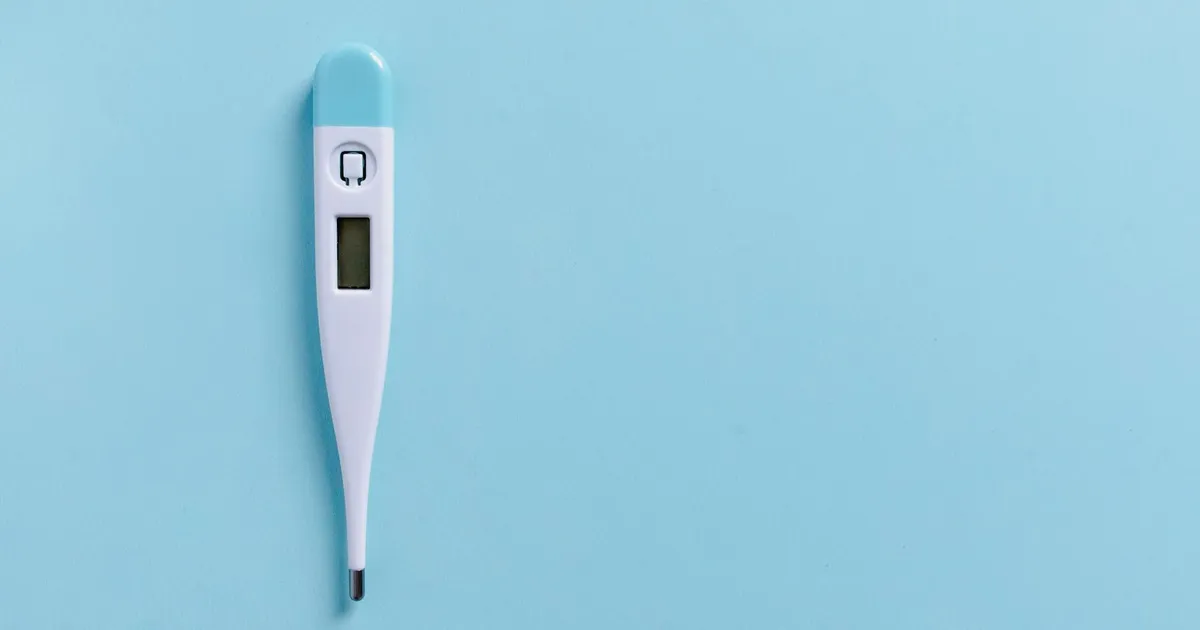
Photo by KitchenTemp via Pexels
What Is a Temperature Data Logger?
A temperature data logger is an electronic device that automatically records temperature readings at set intervals. Unlike a thermometer (which gives you a single reading when you check it), a data logger creates a continuous record — capturing temperature every 5, 15, or 30 minutes, 24 hours a day, including nights and weekends when no staff are present.
For food service operations, data loggers solve one of the most persistent food safety challenges: you cannot manually check refrigerators at 3 AM, but bacterial growth does not pause because the kitchen is closed. A data logger watches your equipment around the clock and alerts you the moment a problem develops.
Types of Temperature Data Loggers
Standalone Data Loggers
Basic data loggers record temperature continuously to internal memory. They must be connected to a computer periodically to download and review the data. They provide a complete historical record but do not provide real-time alerts.
Best for: Operations that need historical documentation for compliance records and are satisfied with periodic review.
Limitation: No real-time alerts. A malfunction at 2 AM is only discovered when someone checks the download in the morning — potentially 6-8 hours later.
Wi-Fi and Cellular Connected Loggers
Connected data loggers transmit readings in real time to a cloud platform. You receive:
- Continuous temperature data accessible from any device
- Immediate alerts when temperature exceeds your set threshold
- Automatic cloud backup of all records
Best for: Operations that want continuous visibility and immediate notification of temperature excursions.
Requirement: Reliable Wi-Fi or cellular signal in all monitored locations (walk-in coolers can have poor Wi-Fi penetration — check signal strength before deploying).
Bluetooth Loggers with Hub Integration
Bluetooth data loggers transmit to a nearby hub device, which then sends data to the cloud via Wi-Fi. This architecture works well for walk-in coolers where direct Wi-Fi penetration is weak.
Best for: Walk-in coolers, freezers, and other locations with weak Wi-Fi but where a hub can be placed nearby.
What Data Loggers Monitor
| Equipment | What to Monitor | Alert Threshold | |-----------|----------------|-----------------| | Walk-in cooler | Air temperature | >41°F (5°C) | | Walk-in freezer | Air temperature | >0°F (-18°C) | | Reach-in refrigerators | Air temperature | >41°F (5°C) | | Prep table cold rail | Air temperature | >41°F (5°C) | | Steam table | Air temperature | <135°F (57°C) | | Hot-holding cabinet | Air temperature | <135°F (57°C) | | Dishwasher final rinse | Water temperature | <180°F (82°C) |
Sensor Placement Best Practices
Where you place a sensor significantly affects the readings it captures and their compliance value.
Refrigerators and Walk-In Coolers
Place in the warmest part of the unit — near the door, not near the evaporator. The FDA 2022 Food Code requires thermometers to be in the warmest location. An inspector who finds a sensor positioned at the coldest spot (near the evaporator) may note it as improperly positioned.
- Position sensor at shelf level where food is typically stored
- At least 3 inches from door edge (not against the door frame)
- Away from the evaporator coil
- At mid-height on the most-used shelf
For walk-in coolers: Mount the sensor on the wall near the entry side at approximately 48 inches height. Consider a second sensor near the back of the unit if the cooler is large (>200 sq ft).
Freezers
Sensor placement in freezers follows the same logic: warmest location, away from the freeze plate or evaporator.
Hot-Holding Equipment
For steam tables and hot-holding cabinets, the sensor should be positioned to monitor the food environment temperature, not the heating element temperature:
- In the air space above the food pans (for air temperature monitoring)
- Not touching the heating element
- Not submerged in water
Note: Hot-holding sensors monitor the equipment environment, but food temperature is still verified with a probe thermometer. Air temperature in a steam table at 160°F does not guarantee food temperature at ≥135°F.
Configuring Alert Thresholds
Alert thresholds should be set tighter than your compliance requirement to give you time to respond before a violation occurs.
| Equipment | Compliance Limit | Recommended Alert Threshold | |-----------|-----------------|------------------------------| | Refrigerators/walk-in | 41°F | 40°F (gives 1°F buffer) | | Freezers | 0°F | 5°F (alerts before hitting limit) | | Hot holding | 135°F | 140°F (alerts before hitting limit) |
Delayed Alert Logic
Configure a delay period before an alert triggers. A refrigerator that reads 42°F for 30 seconds (door just opened) should not generate the same alert as one that has read 42°F continuously for 20 minutes. Most commercial data loggers allow alert delay configuration:
- Recommended cold-storage delay: 15-20 minutes (allows for door cycle recovery)
- Recommended hot-holding delay: 10 minutes
- Freezer delay: 20-30 minutes (freezers recover more slowly)
Escalation Logic
Configure escalating alerts for extended excursions:
- First alert: 15 minutes above threshold → text/email to manager on duty
- Second alert: 30 minutes above threshold → text/email to general manager + owner
- Extended alert: 60+ minutes above threshold → all contacts
Documentation and Compliance Records
The documentation generated by a data logger system is exactly what health inspectors are looking for when they review temperature logs:
What inspectors want to see:
- Readings at regular intervals (every 15-30 minutes is ideal)
- No gaps in coverage (including overnight and weekends)
- Corrective actions linked to out-of-range events
- Evidence that readings are reviewed (not just collected)
What to export for inspection review:
- 30-day temperature history for each monitored unit
- All alert events with timestamp, duration, and resolution
- Corrective action notes for each excursion
- Confirmation that sensors are calibrated
Sensor Calibration and Maintenance
Data loggers require periodic calibration to ensure accuracy. FDA 2022 Food Code requires food temperature measuring devices to be accurate within ±2°F.
Annual Factory Calibration
Most commercial data logger manufacturers offer factory calibration with a NIST-traceable certificate. Schedule this annually. Keep calibration certificates on file for inspection review.
On-Site Verification
Between factory calibrations, verify sensor accuracy monthly:
- Remove sensor from installation
- Place in an ice water bath (32°F / 0°C reference)
- Compare sensor reading to a calibrated reference thermometer
- If off by more than 2°F, recalibrate or replace
Document each verification check. This demonstrates that you are actively maintaining the accuracy of your monitoring system.
Choosing the Right System
| Consideration | What to Look For | |---------------|-----------------| | Number of units | System that scales easily — add sensors without replacing hardware | | Wi-Fi coverage | Test signal in your walk-ins before buying | | Battery life | ≥1 year for sensors in hard-to-access locations | | Data retention | Minimum 90 days cloud retention | | Alert channels | SMS + email + app push notifications | | Export formats | PDF and CSV for inspection reports | | Integration | Connects to your temperature logging platform | | Support | 24/7 support (equipment fails at inconvenient times) |
What Data Loggers Cannot Replace
Data loggers monitor ambient air temperature. They do not:
- Verify food internal temperature during cooking (requires probe thermometer)
- Monitor cooling cycles adequately (cooling requires probing food core, not air)
- Replace the FDA 2022 Food Code requirement for probe thermometers
Think of data loggers as your continuous monitoring layer and probe thermometers as your verification layer. Both are necessary.
How KitchenTemp Helps
KitchenTemp integrates with temperature data loggers to provide a single platform for all your temperature compliance data — continuous sensor readings, manual probe entries, corrective actions, and inspection-ready reports. One dashboard shows every piece of equipment, every reading, every alert event.
No more separate apps for sensor monitoring and manual logging. Start your free trial at KitchenTemp and connect your entire temperature monitoring operation.